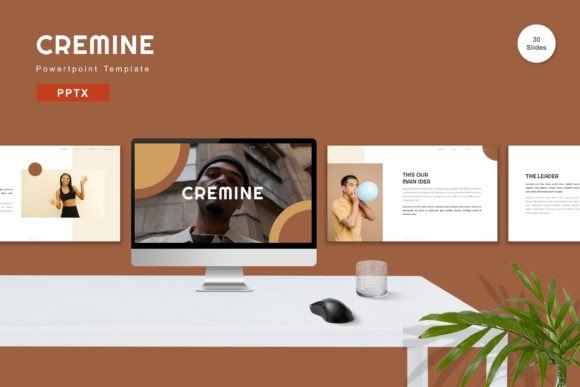
Cremine PowerPoint Template: A Practical Evaluation for Business Presentations
In the landscape of professional communication, the visual delivery of information often dictates its reception. A well-structured presentation can clarify complex data, while a cluttered or outdated design can undermine even the most compelling narrative. The Cremine - Powerpoint Template enters this space as a comprehensive design asset aimed at professionals who require efficiency without sacrificing aesthetic quality. Rather than serving as a mere collection of slides, it functions as a structured framework designed to streamline the creation process for diverse audiences, from corporate executives to freelance consultants.
The primary value proposition of the Cremine template lies in its balance between extensive customization and pre-defined structure. Many designers struggle with the "blank canvas" problem, where the freedom to create anything results in paralysis or inconsistent output. Cremine addresses this by offering a robust set of master slides that enforce design consistency while allowing users to input their specific content effortlessly. This approach is particularly beneficial for teams that need to maintain brand integrity across multiple presentations without dedicating hours to manual formatting.
Design Architecture and Visual Flexibility
At its core, the Cremine - Powerpoint Template is built on vector-based graphics. This technical choice is significant because vectors remain crisp and clear regardless of how much they are scaled, ensuring that charts, icons, and diagrams look professional on high-resolution monitors and large projection screens alike. The template includes 150 total slides, a substantial number that covers a wide array of presentation scenarios. However, quantity alone does not guarantee utility; the arrangement of these slides into 30 distinct, useful layouts is what truly defines its practical application.
One of the standout features is the inclusion of five premade color schemes. In a business context, rebranding a presentation to match a client's palette can be time-consuming if the underlying design relies on hardcoded colors. Cremine simplifies this workflow. Users can switch between these five distinct color themes instantly, allowing for rapid adaptation to different corporate identities or project requirements. This flexibility ensures that the same structural layout can serve a tech startup with a vibrant identity just as effectively as a law firm requiring a more conservative, muted aesthetic.
The use of recommended free web fonts further enhances the template's accessibility. By avoiding proprietary typefaces that might not render correctly on all devices, the creators ensure that the presentation looks consistent whether viewed on a Windows machine, a Mac, or during a live export to PDF. This attention to detail reflects an understanding of the modern presenter's reality, where compatibility issues can derail a meeting before it begins.
Usability and Workflow Integration
For professionals managing tight deadlines, the ease of editing is paramount. The Cremine - Powerpoint Template is designed with a "drag and drop" philosophy in mind. Elements such as image placeholders, text boxes, and chart containers are pre-positioned, reducing the cognitive load required to arrange slide elements. Users can replace placeholder images with their own assets seamlessly, and the layout adjusts accordingly without breaking the grid system.
The template also incorporates animated slides, a feature that adds a layer of dynamism to static data. When used judiciously, animation can guide the audience's focus through a logical progression of ideas, preventing information overload. However, it is worth noting that the effectiveness of these animations depends on the user's ability to apply them appropriately. Overuse can distract, but within the controlled environment of the Cremine master slides, the transitions tend to feel polished rather than chaotic.
A critical component of the package is the inclusion of a Readme file. While often overlooked, this document serves as a vital resource for troubleshooting and understanding the specific mechanics of the template. It guides users on how to edit master slides, change global colors, and manage the various PPTX files included in the download. For those less familiar with advanced PowerPoint features, this documentation bridges the gap between a standard user and a power user, unlocking the full potential of the design.
Real-World Application and Audience Fit
The versatility of the Cremine - Powerpoint Template makes it suitable for a broad demographic, including entrepreneurs pitching to investors, educators preparing lecture materials, and marketers launching new products. Its widescreen format (16:9) aligns with modern display standards, ensuring that content fills contemporary projectors and monitors without awkward black bars or cropping.
Consider a small business owner preparing a quarterly review. They need to present financial data, team updates, and future projections. With Cremine, they can utilize the dedicated infographic slides to visualize growth metrics, the timeline slides to show project milestones, and the comparison slides to analyze market performance. The variety of layouts means they do not have to force their content into a single repetitive format. Instead, each section of the presentation can have a unique visual rhythm while maintaining a cohesive overall look.
For freelancers and consultants, the ability to quickly adapt the template to different clients is a major advantage. The five premade colors allow for immediate rebranding, and the editable nature of every element means that logos and specific brand guidelines can be integrated without hiring a graphic designer. This efficiency translates directly into cost savings and faster turnaround times, which are crucial metrics for independent professionals.
Quality Assessment and Long-Term Value
Evaluating the long-term value of a presentation template involves looking beyond the initial download. Does the design age well? Is it adaptable to future trends? The Cremine template employs a clean, minimalist aesthetic that avoids overly trendy effects that might look dated in a few years. The reliance on solid colors, clear typography, and vector icons suggests a timeless quality that will remain effective as design trends evolve.
However, like any tool, it has limitations. The preview images provided in marketing materials are not included in the final download, which is standard practice but requires users to source their own high-quality imagery. Additionally, while the template offers 150 slides, not every single slide may be relevant to every project. Users must exercise judgment in selecting the appropriate layouts to avoid creating a presentation that feels bloated or disjointed.
The reliability of the template stems from its adherence to PowerPoint's native structure. Because it is based on master slides, changes made at the master level propagate throughout the deck, ensuring consistency. This reduces the risk of accidental formatting errors that often plague manually edited presentations. For organizations that produce frequent reports or pitches, this reliability ensures a professional standard is maintained across all communications.
Conclusion: A Strategic Asset for Content Creators
The Cremine - Powerpoint Template represents a strategic investment for anyone serious about the quality of their visual communication. It moves beyond simple decoration to offer a functional system for organizing and presenting information. By combining a vast library of editable slides with flexible color options and intuitive editing tools, it empowers users to focus on their message rather than their formatting.
Whether you are a seasoned marketer, an educator, or a business owner, the template provides the necessary scaffolding to build compelling narratives. Its strength lies in its balance of structure and freedom, offering enough guidance to ensure professionalism while leaving ample room for personalization. For those seeking to elevate their presentation game without the steep learning curve of custom design software, Cremine offers a practical, efficient, and visually robust solution.
Ultimately, the decision to use the Cremine - Powerpoint Template should hinge on your need for speed, consistency, and visual impact. If your workflow involves frequent presentations where first impressions matter, this tool provides the foundation needed to deliver content with confidence and clarity. It is a resource that respects the user's time while delivering a result that commands attention.