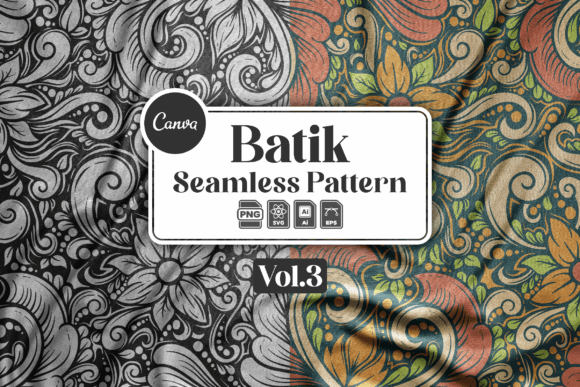
Unlocking Creativity with Batik Abstract Seamless Pattern V3
In the world of digital design, finding a texture that feels both authentic and versatile is often the difference between a generic project and a standout piece. The Batik Abstract Seamless Pattern V3 offers exactly that balance, bringing the rich, organic feel of traditional batik art into a modern, editable format suitable for everything from web backgrounds to textile prints. However, many creators overlook critical details when selecting or implementing such assets, leading to wasted time, poor file compatibility, or final designs that lack the polish they deserve. Understanding what you are actually buying and how to properly utilize these files is essential for getting the most out of your investment.
Understanding What You Are Really Getting
When you encounter a product like this, it is easy to assume that "seamless pattern" means a single image ready to be tiled instantly. While that is part of the truth, the value of Batik Abstract Seamless Pattern V3 lies in its multi-format delivery and editability. This collection provides two distinct seamless patterns: one in full color and another in black only. These are not just static images; they are delivered in four robust formats: .AI (Adobe Illustrator), .EPS, .SVG, and high-resolution PNG with transparent backgrounds.
A common misunderstanding among beginners is assuming the preview images represent the exact final output without any customization. It is crucial to remember that mockup previews are for illustration purposes only and are not included in your download. What you receive are the raw, editable elements. Each file type contains several individual components that you can rearrange, recolor, or modify. This flexibility is the asset's greatest strength, but it also requires a specific workflow that many users skip at their own peril.
The Trap of Ignoring Software Requirements
One of the most frequent mistakes designers make is purchasing vector assets without verifying their software environment. To fully exploit the potential of the .AI and .EPS files included in this pack, you need Adobe Illustrator version 10 or higher. Attempting to open these files in outdated versions of the software or incompatible programs can result in missing effects, broken layers, or a complete failure to load the artwork.
If you do not have access to the latest Adobe Creative Cloud, there are practical alternatives, but they require awareness. For instance, the included .SVG files are web-native and can be opened directly in browser-based design tools like Canva. This is a viable route for marketers or bloggers who rely on cloud platforms rather than desktop software. Similarly, the .PNG files with transparent backgrounds are universal; they can be opened in almost any image editing software, from Photoshop to free tools like GIMP. However, relying solely on the PNG version limits your ability to scale the design without losing quality or change the underlying colors. If your project demands print-ready scalability or complex layer manipulation, skipping the vector formats will inevitably compromise your final presentation.
Editing Mistakes That Ruin the Flow
Even with the right software, users often struggle with the actual editing process. The instruction set for Batik Abstract Seamless Pattern V3 suggests opening the Illustrator file and editing with the provided template support. A common error here is trying to edit the artwork as a flattened group or ignoring the layered structure. Because each file contains several elements designed for you to arrange yourself, simply dragging the entire pattern onto a canvas without understanding the composition can lead to awkward gaps or repetitive visual noise.
To avoid this, take a moment to explore the layers panel before making changes. The "full color" and "black only" variations are separate entities, allowing you to mix and match if needed. For example, you might want to use the black line work as a base and overlay a custom gradient, or perhaps extract specific motifs to create a new layout entirely. Failing to separate these elements means you miss the opportunity to add your own unique touch. The goal is not just to paste the pattern but to integrate it seamlessly into your brand identity. If you find the basic effects in Illustrator challenging, remember that knowing how to apply simple transformations—like scaling, rotating, or adjusting opacity—is sufficient to achieve professional results.
Choosing the Right Format for Your Project
Selecting the correct file format is not a trivial decision; it dictates where and how your design can be used. If you are creating a website background, the .SVG file is likely your best choice due to its lightweight nature and infinite scalability on screens. Conversely, if you are preparing a design for large-scale printing, such as banners or fabric, the .AI or .EPS files are non-negotiable to ensure crisp edges at any size.
Many entrepreneurs make the mistake of downloading all formats and then using the wrong one for the task, which leads to pixelation or massive file sizes that slow down websites. Here is a practical approach:
- For Web Designers: Prioritize the SVG files for icons and backgrounds, and use PNGs for quick overlays where vector data isn't strictly necessary.
- For Print Professionals: Stick to AI or EPS files to maintain vector integrity during the pre-press process.
- For Social Media Managers: The high-resolution PNGs with transparent backgrounds are perfect for quickly dropping textures over photos in mobile apps or simple editors.
By matching the file type to the medium, you ensure efficiency and maintain the high quality that defines the Batik Abstract Seamless Pattern V3.
Verifying Quality Before Finalizing
Before you commit to using these patterns in a client project or a commercial product, always perform a "zoom test." Open the file in your preferred software and zoom in to 400% or higher. Check the edges of the batik motifs to ensure there are no jagged lines or unintended artifacts. Since the package includes editable templates, you should also verify that the color profiles are set correctly for your intended output (CMYK for print, RGB for screen).
Another overlooked detail is the licensing and usage rights. While this guide focuses on technical implementation, always review the terms of use associated with your purchase to ensure you are compliant with commercial restrictions. Finally, do not hesitate to reach out for support. The creator encourages contact for assistance with the art, and utilizing this resource can save hours of frustration if you encounter issues with specific effects or file structures.
Ultimately, the Batik Abstract Seamless Pattern V3 is a powerful tool, but its power is unlocked only through informed usage. By respecting the software requirements, choosing the right formats, and taking the time to edit the elements thoughtfully, you transform a standard asset into a bespoke design element that elevates your work.