Wildflower Silhouette Collection: A Guide to Premium Vector Assets
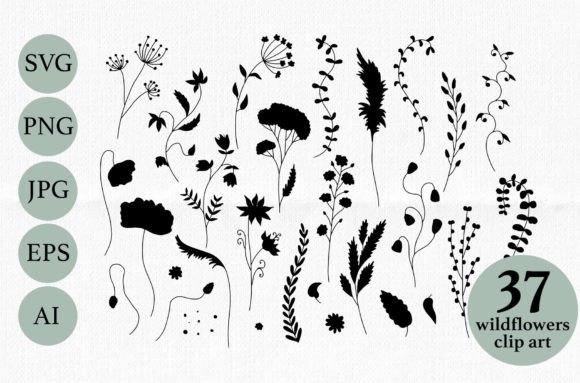
There is a timeless elegance in the simple outline of a flower. It strips away color and texture to reveal the essential form, making it incredibly versatile for modern design. The Wildflower Silhouette Collection - Premium Black Vector Set offers exactly this kind of refined aesthetic. By providing 37 distinct wildflower designs in high-resolution formats, this set allows creators to embrace nature's beauty without the clutter of photorealistic details. However, simply downloading a file does not guarantee a professional result. Many designers overlook critical technical details that can compromise their final project, leading to pixelated prints or awkward overlays.
Understanding the Value of Format Flexibility
The primary strength of the Wildflower Silhouette Collection lies in its versatility. Unlike standard stock photos that come in a single format, this premium set includes Transparent PNGs, JPGs, SVGs, EPS files, and AI vectors. This variety is not just a marketing feature; it is a functional necessity for different workflows. Beginners often make the mistake of assuming one format fits all scenarios. They might download the JPG version because it loads quickly on their computer, only to discover later that it cannot be resized for a billboard or used effectively in a layered graphic.
When you work with the Transparent PNG files included in this collection, you are equipped for immediate use in raster-based software like Adobe Photoshop or GIMP. These files are perfect for overlays where you need the black silhouette to sit cleanly over a textured background or a photograph. The transparency ensures there are no unsightly white boxes around your flowers. Conversely, if you attempt to use a JPG with a white background for an overlay, you will likely end up spending hours trying to mask out the edges, which rarely looks as clean as a native transparent layer.
Avoiding the Scalability Trap
One of the most common errors professionals and hobbyists alike encounter is using raster images for large-scale print projects. If you select the JPG or PNG versions from the Wildflower Silhouette Collection for a t-shirt design intended for a large poster, you risk significant quality loss. Raster images are made of pixels; when stretched beyond their original dimensions, they become blurry and jagged. The tallest element in this collection is 3172 pixels, which is excellent for web and small-to-medium print, but it has limits.
To avoid this pitfall, you must utilize the vector formats provided: SVG, EPS, and AI. These files are mathematical descriptions of shapes rather than grids of pixels. This means you can scale a tiny wildflower icon up to the size of a building mural without losing a single ounce of sharpness. If you are using software like Adobe Illustrator, Inkscape, or CorelDRAW, always start with the AI or EPS file. This approach ensures that your design remains crisp regardless of the output size, saving you from costly reprints and wasted materials.
Navigating File Organization and Licensing
Another area where users often stumble is in managing the sheer volume of assets. With 37 individual wildflowers available in multiple formats, disorganization can lead to frustration. You might find yourself searching for a specific daisy silhouette only to realize you have downloaded the wrong version or lost track of the vector source file. Before you begin your project, take a moment to organize your folders logically. Separate your raster files (PNG/JPG) from your vector files (SVG/EPS/AI). This small step streamlines your workflow and prevents the accidental deletion of editable source files.
Furthermore, understanding what is included helps manage expectations regarding customization. The set comes with 37 JPGs on a white background at 300 dpi and 37 PNGs on a transparent background at 300 dpi. While these are ready-to-use, they are static. If you need to change the shape of a petal or combine two flowers into a new pattern, the JPG and PNG formats will not allow this. You must rely on the single EPS10 and AI files included in the package. These contain all the paths necessary for deep editing. Ignoring this distinction can lead to a situation where you feel limited by your assets, forcing you to buy additional resources when the solution was already in your folder.
Practical Applications for Every Creator
The utility of the Wildflower Silhouette Collection extends far beyond simple decoration. For bloggers and marketers, the high-quality JPGs are ideal for web content, ensuring fast load times while maintaining visual appeal at 300 dpi. Educators can use the clear, bold lines of the silhouettes to create worksheets or presentation slides where clarity is paramount. Small business owners looking to create logos or branding materials should prioritize the vector files to ensure their brand identity scales perfectly across business cards, signage, and merchandise.
Consider a scenario where a freelancer is designing a wedding invitation suite. Using the PNG overlays, they can place delicate wildflower silhouettes over a watercolor background, creating a romantic, layered effect. However, if they also need to emboss the same flower onto the envelope, they would switch to the AI file to create the die-cut path. By leveraging the full range of formats, the creator achieves a cohesive look across different mediums without compromising quality.
Key Checks Before You Download
Before committing to any digital asset purchase, including the Wildflower Silhouette Collection, perform a quick audit of your project requirements. Ask yourself three questions: What is my final output size? Do I need to edit the shape of the elements? What software am I using? If your answer to the first question involves large-scale printing, verify that the package includes vector files. If you need to modify the artwork, ensure the AI or EPS files are compatible with your software version.
By taking these precautions, you transform a simple download into a powerful tool for creativity. The Wildflower Silhouette Collection is designed to be robust, but its potential is only unlocked when you understand how to wield its various formats correctly. Avoid the trap of convenience that leads to poor results, and instead, choose the right file for the right job. This disciplined approach ensures that your designs remain elegant, professional, and technically sound, allowing the natural beauty of the wildflowers to shine through in every project you undertake.